 UsefulTab
How to convert JSON to CSV
You have JSON (an API response, an export, a config) and you need it in a spreadsheet. This guide shows the JSON shape that converts cleanly, what happens to nested data, quotes and line breaks, and how to convert in your browser without sending the data anywhere.
Need it done now? Paste the JSON, press Convert, copy or download the CSV.
A JSON array of objects in · CSV, semicolon-separated or TSV out · nothing uploaded
At a glance
| Input | Pasted JSON: an array of objects, or a single object (one row). |
|---|---|
| Columns | Every key found in any object, in the order first seen. A missing key leaves an empty cell. |
| Nested values | Written into the cell as compact JSON text. They are not split into extra columns. |
| Output | Comma, semicolon or tab separated text, with quotes added where a value needs them. Copy it or download data.csv (UTF-8). |
| Size | No row limit is set; very large pastes are limited by your browser's memory. Excel itself stops at 1,048,576 rows. |
The structure that converts cleanly
CSV is a flat grid, so the ideal input is an array of flat objects: each object is a row, each key a column. Keep the keys consistent across objects for a tidy table.
Worked example: three orders with awkward values
Repeat it with our sample file: sample-orders.json (invented orders). It has a comma inside a name, quotes inside a name, an accented letter, a nested object, an array, a line break and keys that only some orders have:
[
  {
    "order_id": "A-1001",
    "customer": "Rivera, Sam",
    "items": 2,
    "total": 38.5,
    "shipped": true,
    "address": { "city": "Leeds", "country": "GB" }
  },
  {
    "order_id": "A-1002",
    "customer": "Noor \"Nina\" Haddad",
    "items": 1,
    "total": 12,
    "shipped": false,
    "tags": ["gift", "express"]
  },
  {
    "order_id": "A-1003",
    "customer": "Zoë Lindqvist",
    "items": 5,
    "total": 104.25,
    "shipped": true,
    "note": "Leave at the\nside door"
  }
]
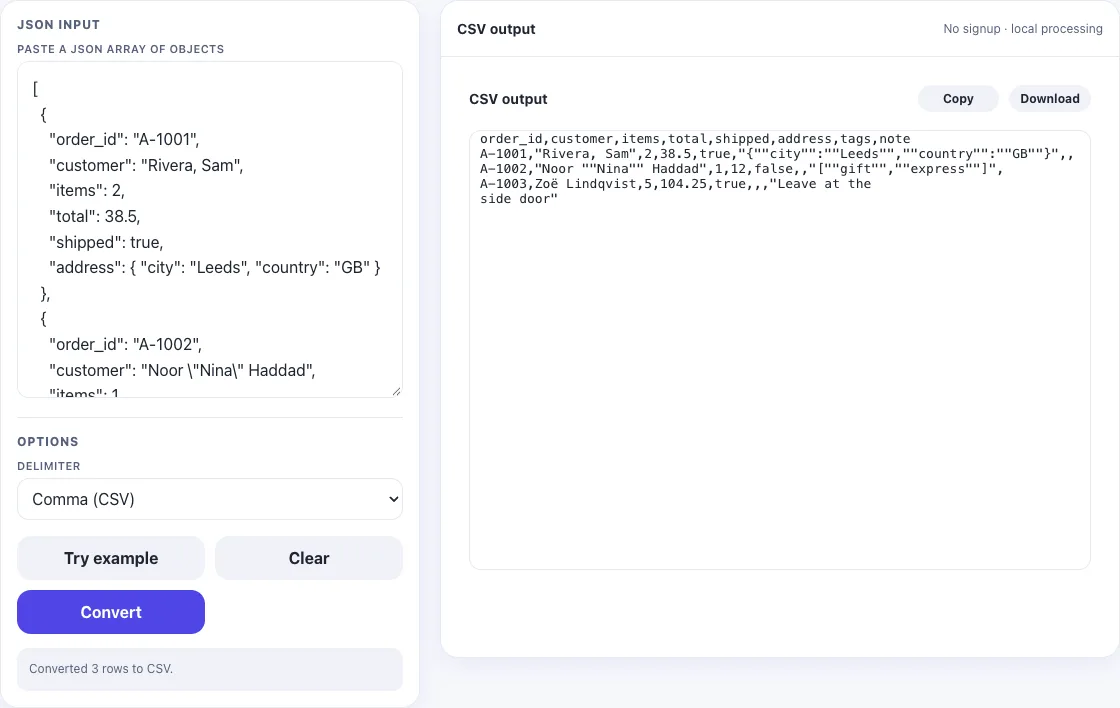
Pasted into JSON to CSV with the comma delimiter, it gives Converted 3 rows to CSV. and this output:
order_id,customer,items,total,shipped,address,tags,note
A-1001,"Rivera, Sam",2,38.5,true,"{""city"":""Leeds"",""country"":""GB""}",,
A-1002,"Noor ""Nina"" Haddad",1,12,false,,"[""gift"",""express""]",
A-1003,Zoë Lindqvist,5,104.25,true,,,"Leave at the
side door"
- Columns come from every key:
tagsandnoteappear even though only one order has each. - “Rivera, Sam” is wrapped in quotes because it contains a comma.
- Inner quotes are doubled (
""Nina""), the standard CSV escape. - The nested address and the
tagsarray stay as JSON text in one cell. - The line break in the note is kept inside a quoted cell, so the row continues on the next line.
If it doesn't work
| What you see | Why | What to do |
|---|---|---|
| “Invalid JSON: …” with a line and column | The text is not valid JSON. With one comma removed from the sample, Chrome reports Invalid JSON: Expected ',' or '}' after property value in JSON at position 265 (line 14 column 5). Other browsers word it differently. | Fix the spot it points to; the JSON Formatter shows errors in context. |
| Could not convert: expected an array of objects — no object keys found. | The array holds plain values, like [1, 2, 3], so there are no columns. | Wrap each value in an object, for example {"value": 1}. |
| Accented letters look wrong in Excel | Excel may not read the file as UTF-8 when you double-click it. | Use Data › From Text/CSV and choose UTF-8, or open it in Google Sheets. |
| Everything lands in one column | Your spreadsheet expects a different separator (common where the comma is a decimal mark). | Convert again with Semicolon, or use Tab and paste. |
A cell shows JSON like {"city":…} | That value was nested. | Move the values you need to the top level of each object, then convert. |
A value that starts with =, +, -
or @ may be treated as a formula when a spreadsheet opens
the file. The tool writes values as they are, so check data from
untrusted sources before opening it.
Going the other way
A spreadsheet export back into JSON for code is just as quick with CSV to JSON, and CSV to Excel makes a native .xlsx file.
A note on privacy
Datasets often contain customer or internal data. JSON to CSV parses and converts entirely in your browser, so nothing you paste is ever uploaded to a server.